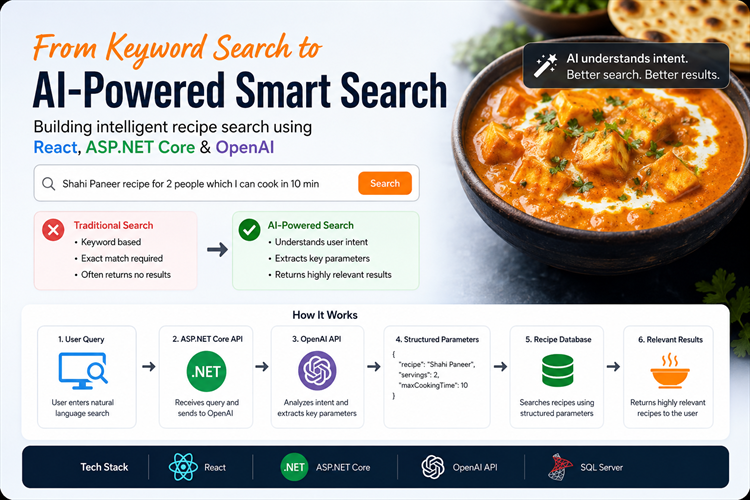
How I Transformed Traditional Recipe Search into AI-Powered Smart Search Using React, ASP.NET Core and OpenAI
1. Introduction
While working on a food recipe platform built with React and ASP.NET Core Web API, I encountered a common problem: traditional search was not meeting user expectations.
Users rarely search using exact recipe names. Instead, they type natural language queries such as:
"Shahi Paneer recipe for 2 people which I can cook in 10 minutes"
Traditional database searches based on keyword matching struggled to understand these requests, often resulting in poor or no results.
2. The Problem with Traditional Search
Describe how your original search worked.
- Category dropdown
- Search textbox
- SQL keyword matching
- Limited results when users used conversational queries
Provide examples of searches that failed.
3. Why We Needed AI
Explain that users think in terms of intent, not database fields.
Example:
User query
"Healthy vegetarian dinner under 500 calories"
The database contains:
- Recipe Name
- Category
- Cooking Time
- Ingredients
- Calories
But the user's request combines multiple requirements that are difficult to handle with simple keyword searches.
4. Solution Architecture
Instead of replacing the existing search system, I enhanced it using the OpenAI API.
The goal was simple:
Convert natural language queries into structured search filters that the database can understand.
User Search Query ↓React Frontend ↓ASP.NET Core Web API ↓OpenAI API(Intent Analysis) ↓Structured JSON Filters ↓SQL Server Search ↓Recipe Results
5. How It Works
Discuss:
- React search interface
- ASP.NET Core API endpoint
- OpenAI integration
- Prompt engineering
- Parsing AI response
- Database filtering
When a user enters a query, the ASP.NET Core API sends it to OpenAI with a carefully designed prompt.
Example query:
Shahi Paneer recipe for 2 people which I can cook in 10 minutes
Example:{ "recipeName": "Shahi Paneer", "ingredients": ["paneer", "onion", "tomato", "cashew"], "tags": ["indian", "curry"], "maxCookingTime": 10, "servings": 2, "calories": null, "dietType": 1}
The application then uses these values to build database filters and return relevant recipes.
6. Results
Share measurable improvements if possible:
- Better search accuracy
- More relevant results
- Improved user experience
- Reduced "no results found" cases
7. Key Learning
Discuss:
- AI is not a replacement for databases.
- AI can be used as an intelligent query interpreter.
- Combining traditional search with AI often works better than replacing everything with AI.
8. Conclusion
AI-powered search is not just for large platforms. Even a recipe website can benefit significantly from natural language understanding.
By using OpenAI as an intent parser and keeping the existing database search architecture intact, I was able to deliver a more intuitive and user-friendly search experience with minimal disruption to the existing system.
Please try on https://mealformula.com/
Thanks, for reading the blog, I hope it helps you. Please share this link on your social media accounts so that others can read our valuable content. Share your queries with our expert team and get Free Expert Advice for Your Business today.