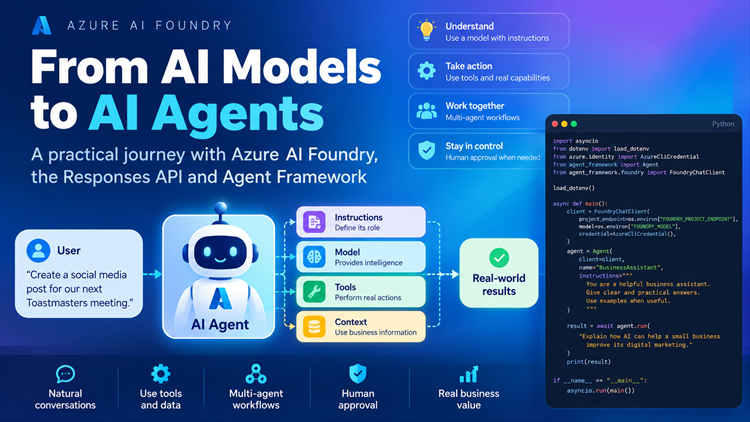
From AI Models to AI Agents: What I’ve Learned Building with Azure AI Foundry
AI is moving beyond simply answering questions.
Today, we can build applications where an AI model can understand a request, decide what needs to happen, use tools, work with other agents, ask for human approval, and continue the task.
As part of my AI learning journey, I have been building a practical project using Microsoft Azure AI Foundry, the OpenAI Responses API, and Microsoft Agent Framework.
Rather than jumping straight into a large application, I have been building the concepts one by one.
This is what I have learned so far.
1. It starts with an AI model
At the beginning, an AI application can be very simple.
We send a request to a model:
"What is Azure AI Foundry?"
The model processes the request and generates a response.
Conceptually:
User → AI Model → Response
This is useful, but it is still mainly a question-and-answer system.
The model itself does not automatically know how to perform actions in our application.
For example, if I ask:
"Calculate my marketing campaign cost."
The model can perform the calculation itself.
But what if I want the AI application to use a specific business function, check a database, create a ticket, or publish a social media post?
This is where things become more interesting.
2. Azure AI Foundry provides the environment
One of the first things I learned was how an application connects to an Azure AI Foundry project.
Azure AI Foundry provides the environment for working with AI models, projects, deployments, agents, evaluation and other AI capabilities.
In my practical exercises, I used:
-
An Azure AI Foundry project
-
Microsoft Entra authentication
-
A deployed model
-
Python
-
Azure AI SDKs
-
OpenAI-compatible APIs
The important lesson for me was that the model is only one part of an AI application.
The surrounding application architecture is equally important.
3. The OpenAI Responses API introduces conversation state
Next, I worked with the OpenAI Responses API through Azure AI Foundry.
One useful concept was:
previous_response_id
Instead of treating every request as completely independent, a response can be connected to a previous response.
Conceptually:
Request 1 → Response 1
Then:
Response 1 → Request 2 → Response 2
This allows an application to continue a conversation without manually rebuilding all of the previous context.
This was one of the first steps toward building applications that maintain state rather than simply making isolated AI calls.
4. So what is an AI Agent?
This was the major conceptual step.
An AI agent is more than simply a model receiving a prompt.
An agent is an AI application component that is configured with things such as:
-
Instructions
-
A model
-
Tools
-
Context
-
Conversation state
-
The ability to perform actions
A simplified architecture looks like this:
User
↓
Agent
↓
Model + Instructions + Tools + Context
↓
Action / Response
For example, imagine a business assistant.
A user says:
"Check whether our marketing campaign is within budget."
The agent can understand the request and determine that it needs to use a particular business function.
That function could calculate the campaign cost and check the budget.
The model provides the reasoning and decision-making, while the application provides the actual capabilities.
5. Agent does not mean the AI can do everything
This was an important distinction.
An agent does not magically gain access to every system.
If we want an agent to perform an action, we need to provide an appropriate capability.
For example:
Agent
 ├── calculate_campaign_cost
 ├── check_campaign_budget
 └── publish_social_post
These capabilities are provided as tools.
This leads to one of the most important concepts I have learned so far.
6. Tools give agents capabilities
A tool is a function that an agent can use to perform a specific task.
For example:
calculate_campaign_cost()could calculate a campaign's monthly cost.
Another tool could be:
check_campaign_budget()which checks whether the campaign is within a specified budget.
The overall flow becomes:
User → Agent → Model decides a tool is needed → Tool executes → Result returns to Agent → Agent responds
This is fundamentally different from simply asking the model to calculate everything itself.
The application controls what the AI is allowed to do.
7. Tool descriptions matter
I also learned that tools need to be described clearly.
For example, a parameter such as:
monthly advertising spend
should have a useful description.
This helps the model understand what information the tool expects.
In Python, concepts such as Annotated and Pydantic Field can be used to provide descriptions for tool parameters.
This may seem like a small implementation detail, but it is important when building reliable agent applications.
The model needs to understand:
-
What the tool does
-
What parameters it requires
-
What those parameters mean
-
What the tool returns
8. An agent can have multiple tools
A real application will usually need more than one capability.
For example, a marketing assistant could have:
Marketing Agent

    ├── calculate_campaign_cost
    │
    ├── check_campaign_budget
    │
    ├── create_social_post
    │
    └── publish_social_post
The agent can determine which tool is relevant to the user's request.
This is where an agent starts behaving more like an assistant capable of completing tasks rather than simply answering questions.
9. Tool errors are part of real applications
One of the most useful lessons came from deliberately creating tool errors.
For example, suppose the advertising spend is negative.
A business function should not simply accept invalid data.
The tool can validate the input and raise an error or return a controlled error message.
This introduced an important principle:
AI applications need traditional software engineering as well.
AI does not replace validation, error handling, logging, authentication or application logic.
A reliable agent system needs both:
AI capabilities + software engineering
10. Human approval makes agents safer
This was another important concept I implemented.
Imagine an agent has a tool:
publish_social_post()We probably don't want the AI to publish something publicly without any human involvement.
So we can configure the tool to require approval.
The flow becomes:
User
↓
Agent
↓
Agent decides to call publish tool
↓
Human approval required
↓
Human approves
↓
Tool executes
↓
Published
This is known as a human-in-the-loop pattern.
It is especially useful for actions that have real-world consequences.
Examples include:
-
Publishing social media content
-
Sending an email
-
Creating a financial transaction
-
Deleting data
-
Updating a customer record
-
Deploying software
-
Making changes to production systems
The goal is not to remove humans from the process.
The goal is to allow AI to automate appropriate work while keeping humans in control of important actions.
11. Conversation state becomes important
During the tool approval exercise, I encountered an interesting technical problem.
The approval itself worked, but when I manually reconstructed the conversation, the Responses API complained about missing reasoning context.
This highlighted something important:
Conversation state is not simply the visible text of a conversation.
Modern AI systems can have additional state associated with responses, tool calls and reasoning.
With Agent Framework, a session can be used to maintain the conversation state.
Conceptually:
Agent
  ↓
Session
  ↓
Tool approval request
  ↓
Human approval
  ↓
Session continues
  ↓
Tool execution
This is different from the lower-level Responses API approach where we can use:
previous_response_idThe two concepts solve related but different problems at different layers.
12. Agents can work together
Another major concept I learned was multi-agent workflows.
Instead of asking one agent to do everything, we can create specialised agents.
For example:
Writer Agent
      ↓
Reviewer Agent
      ↓
Editor Agent
The Writer creates content.
The Reviewer checks the content.
The Editor produces the final version.
This is a sequential workflow.
The important idea is that different agents can have different responsibilities.
For a business application, we might have:
Research Agent
      ↓
Analysis Agent
      ↓
Report Agent
or:
Customer Support Agent
      ↓
Technical Agent
      ↓
Escalation Agent
The workflow coordinates the agents.
13. Agent vs Workflow
This distinction became much clearer while building the project.
Agent
An agent is an AI component configured to perform a role.
For example:
"You are a marketing reviewer."
Workflow
A workflow controls how multiple components interact.
For example:
Writer → Reviewer → EditorSo:
Agent = participant
Workflow = coordination
This distinction is important when designing larger AI applications.
14. What could this look like in real life?
Imagine I wanted to build an AI-powered marketing assistant.
A user could say:
"Create a social media post for our next Toastmasters meeting."
The system could potentially perform the following:
User request
     ↓
Marketing Agent
     ↓
Create content
     ↓
Review content
     ↓
Generate image
     ↓
Check brand requirements
     ↓
Ask for human approval
     ↓
Publish
     ↓
Track performance
The AI model provides intelligence.
Agents provide specialised behaviour.
Tools provide actions.
Workflows coordinate the process.
Human approval provides control.
This is much closer to a real AI application than simply asking ChatGPT a question.
15. What I have learned from building rather than just reading
The biggest lesson so far is that understanding AI agents requires more than understanding prompts.
I have learned about:
-
Azure AI Foundry projects
-
Model deployments
-
Microsoft Entra authentication
-
OpenAI-compatible APIs
-
Responses API
-
Conversation state
-
Agents
-
Agent Framework
-
Tools
-
Tool registration
-
Multiple tools
-
Tool selection
-
Tool validation
-
Tool errors
-
Human approval
-
Agent sessions
-
Sequential workflows
-
Multi-agent systems
But more importantly, I have seen that things don't always work exactly as expected.
That is actually one of the most valuable parts of hands-on learning.
For example, an approval workflow that looked simple became a lesson about preserving the correct conversation state and the relationship between tool calls, reasoning and responses.
That is something a diagram alone doesn't teach very well.
16. A simple mental model
At this stage, this is the mental model I use:
                    AI APPLICATION
                          │
                          ▼
                       AGENT
                          │
             ┌────────────┼────────────┐
             ▼            ▼            ▼
           MODEL        TOOLS        CONTEXT
             │            │            │
             │            │            │
             └────────────┼────────────┘
                          ▼
                       ACTION
                          │
                          ▼
                    HUMAN APPROVAL
                          │
                          ▼
                     REAL WORLD
And when multiple agents are involved:
Agent 1
   ↓
Agent 2
   ↓
Agent 3
   ↓
Final result
A workflow manages that coordination.
17. What's next?
So far, I have mainly worked with tools that I define directly inside my Python application.
But this creates another question:
What happens when tools are provided by external systems?
For example:
AI Agent
   ↓
External database
External files
GitHub
CRM
Search system
Business applications
How can we connect AI applications to external capabilities using a common standard?
This leads to the next major topic in my learning journey:
Model Context Protocol — MCP
MCP provides a standard way for AI applications to connect with external tools, resources and prompts.
Instead of building a separate integration pattern for every application, MCP provides a common protocol for connecting AI applications with external capabilities.
That is where I am heading next in this learning journey.
Final takeaway
My understanding of AI agents has evolved from:
"An AI model answers questions."
to:
"An AI agent can use a model, understand a goal, select appropriate capabilities, use tools, maintain context, coordinate with other agents, and involve humans when necessary."
The next step is to understand how these agents can connect to capabilities outside the application itself.
Next stop: MCP.
Thanks, for reading the blog, I hope it helps you. Please share this link on your social media accounts so that others can read our valuable content. Share your queries with our expert team and get Free Expert Advice for Your Business today.