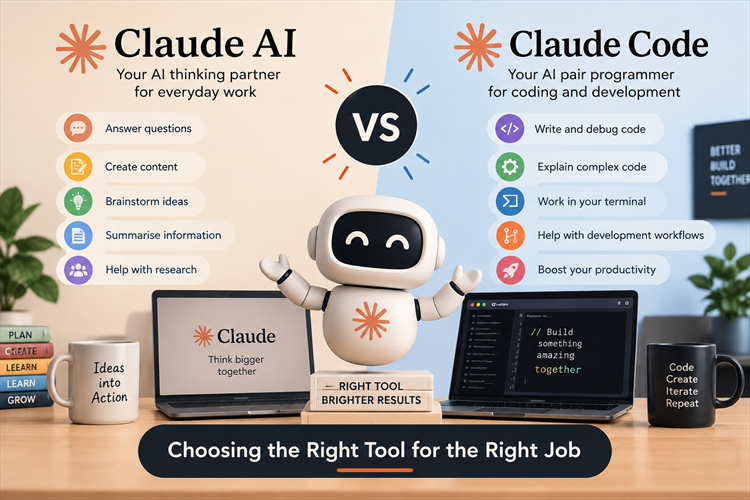
Claude AI vs Claude Code-Choosing the Right Tool for the Right Job
A practical guide to choosing the right AI tool and getting better results
AI coding tools are becoming part of everyday software development. But with so many AI tools available, one question keeps coming up: Which tool should I use for which job?
I recently completed Claude 101 and Claude Code 101, and while learning both, one thing became clear to me: Claude and Claude Code are not really competing tools. They solve different problems.
If you understand where each tool fits, you can get much better results and avoid using the wrong tool for the job.
What is Claude AI?
Claude is an AI assistant developed by Anthropic. You can use Claude for many general-purpose tasks such as:
· Writing and improving content
· Summarising documents
· Brainstorming ideas
· Analysing information
· Explaining technical concepts
· Creating documentation
· Reviewing code
· Planning software architecture
· Generating SQL queries
· Learning new technologies
For example: "Explain Azure Functions to me as a .NET developer who already understands ASP.NET Core." The important part is giving Claude context about your background. That usually produces a much more useful response.
What is Claude Code?
Claude Code is designed specifically for software development. The biggest difference is the working environment. Instead of simply asking questions in a chat, Claude Code can work with your development project and its files.
· Understanding an existing codebase
· Creating new features
· Refactoring code
· Finding bugs
· Writing tests
· Updating multiple files
· Working with Git
· Understanding project structure
· Reviewing implementation
· Running development commands
· Making changes across a project
Claude AI vs Claude Code
|
Task |
Claude AI |
Claude Code |
|
Learn a new technology |
Excellent |
Possible |
|
Brainstorm ideas |
Excellent |
Possible |
|
Write documentation |
Excellent |
Good |
|
Explain code |
Excellent |
Excellent |
|
Review a single code snippet |
Excellent |
Possible |
|
Understand an entire repository |
Limited |
Excellent |
|
Modify multiple files |
Limited |
Excellent |
|
Refactoring |
Good |
Excellent |
|
Write unit tests |
Good |
Excellent |
|
Debug an application |
Good |
Excellent |
|
Work with Git |
Limited |
Excellent |
|
Implement a feature |
Limited |
Excellent |
|
Software architecture discussion |
Excellent |
Excellent |
The important point is: Don't ask which one is better. Ask which one is better for the task you are doing.
When should you use Claude AI?
I would normally use Claude AI when I need to think, learn, research, explain or create.
1. Learning something new
If I am learning a new technology, I can have a conversation with Claude. For example: "I'm an experienced .NET developer but new to Kubernetes. Explain Kubernetes using concepts I already understand from Docker and ASP.NET Core." This gives Claude useful context and lets it relate the answer to things I already know.
2. Planning a project
Before writing code, I often want to think through the problem. Claude can help with architecture, database design, APIs, security, deployment, scalability and potential problems.
Sometimes planning first saves much more time than coding first.
3. Understanding a difficult concept
AI is also very useful as a personal tutor. You can continue asking questions until the concept becomes clear.
When should you use Claude Code?
Claude Code becomes much more interesting when you are actually working inside a software project.
1. Understanding an existing codebase
A good starting prompt is: "Analyse this project and explain the architecture. Identify the main projects, important services, database access layer and external integrations. Don't make any changes."
Before asking an AI to change your code, let it understand the code first.
2. Implementing a feature
Instead of simply saying "Create an API for customer orders", give Claude Code more context and ask it to follow the existing architecture and coding patterns in the project.
3. Refactoring
Claude Code can help review services for maintainability and duplicated logic. A useful approach is to ask: "Review this service for maintainability and identify duplicated logic. Suggest a refactoring approach without changing behaviour."
4. Writing tests
Ask Claude Code to review a class and identify missing unit test scenarios while following the existing testing framework and patterns.
The biggest lesson: Context matters
One of the biggest lessons I have learned while working with AI is that the quality of the answer depends heavily on the quality of the context you provide.
Weak prompt:
Fix this code.
Better prompt:
This is an ASP.NET Core Web API using SQL Server, Dapper and an existing API contract. The endpoint is returning duplicate records under certain conditions. Review the existing implementation, identify the root cause, explain it first, and then suggest the smallest change that fixes the problem.
My practical tips for getting better results from Claude
1. Give Claude a role
For example: "Act as a senior .NET engineer reviewing production code."
2. Explain the goal
Explain why you need a change, not only what you want changed.
3. Give technical context
Mention the language, framework, database, architecture, libraries, deployment environment and constraints.
4. Tell it what NOT to do
For example: "Do not change the database schema" or "Do not introduce Entity Framework."
5. Ask for an explanation before changes
Try: "First analyse the problem and explain the root cause. Then propose two solutions. Do not modify the code yet."
6. Break large tasks into smaller tasks
Break work into requirements, architecture, database, API, implementation, tests, security and documentation.
7. Ask Claude to review its own work
Ask it to look for bugs, security issues, edge cases and breaking changes after implementation.
8. Don't accept the first answer blindly
AI can be confident and still be wrong. Validate suggestions before using them.
Claude Code doesn't replace the developer
I don't see Claude Code as a replacement for software developers. I see it as a very powerful development assistant.
You still need to understand what you are building, why you are building it, security, architecture, performance, business requirements, data, testing, deployment and maintenance.
The AI can help you move faster, but you are still responsible for the final result.
Claude AI + Claude Code together
For me, the most interesting approach isn't choosing one. It's using both.
Step 1 — Claude AI
Discuss the problem and explore possible architectures and approaches.
Step 2 — Plan
Discuss architecture, technology choices, database, APIs, security and scaling.
Step 3 — Claude Code
Move into the actual repository and implement the agreed approach.
Step 4 — Review
Review code quality, tests, security, performance and edge cases.
Step 5 — Human review
Finally, you review the changes and make the final engineering decision.
Claude AI or Claude Code? My simple rule
Use Claude AI when you are thinking.
Learn → Plan → Brainstorm → Explain → Analyse → Write
Use Claude Code when you are building.
Inspect → Modify → Refactor → Test → Debug → Review
And sometimes you'll use both for the same task.
Final thoughts
Completing Claude 101 and Claude Code 101 helped me better understand that AI tools are not simply about asking better questions. They are also about choosing the right workflow.
Claude AI is great when you want an AI partner to help you think, learn and explore ideas. Claude Code becomes much more powerful when you're working directly with a software project and need help understanding, modifying and testing the code.
AI should make you a better developer, not make you stop thinking like one.
The best results come when we combine AI capability with human experience, context and judgement. That's where I think the real value of AI-assisted development is.
About my Claude learning journey
I recently completed Claude 101 and Claude Code 101, and I'm continuing to explore how Claude and other AI development tools can be used in real-world software engineering.
I'm particularly interested in AI-powered enterprise applications, developer productivity and human-in-the-loop workflows.
I'll be sharing more practical experiments and lessons as I continue exploring these tools.
If you're using Claude or Claude Code, I'd love to hear how you're using them in your development workflow.
Thanks, for reading the blog, I hope it helps you. Please share this link on your social media accounts so that others can read our valuable content. Share your queries with our expert team and get Free Expert Advice for Your Business today.